




 (48 votes, average: 4.27 out of 5)
 Loading...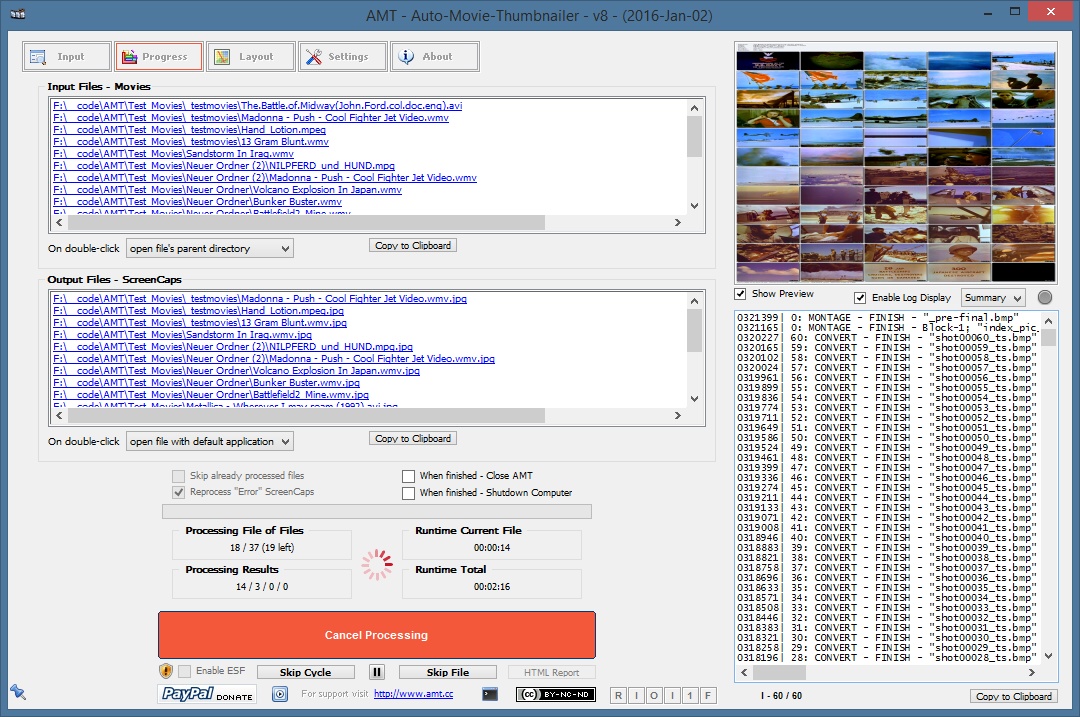
THE Batch Movie ScreenCap Creator… Create ScreenCaps of
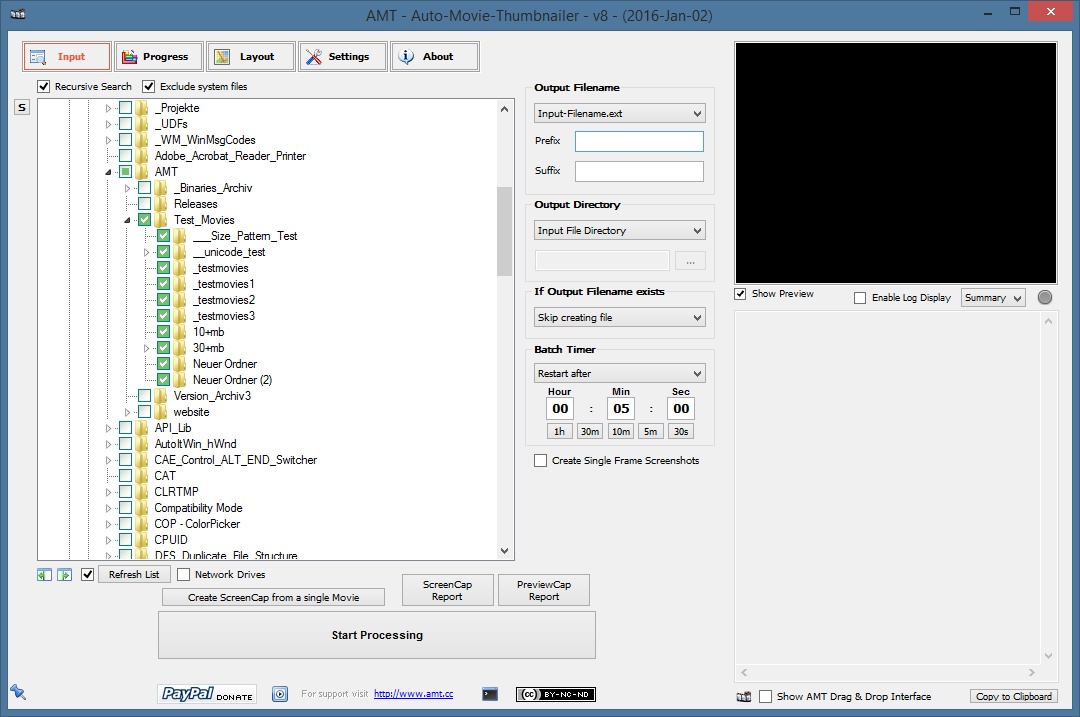
– any number of movies,
– located anywhere on your computer,
– manually or with a time-scheduler,
– with a free to choose number of caps,
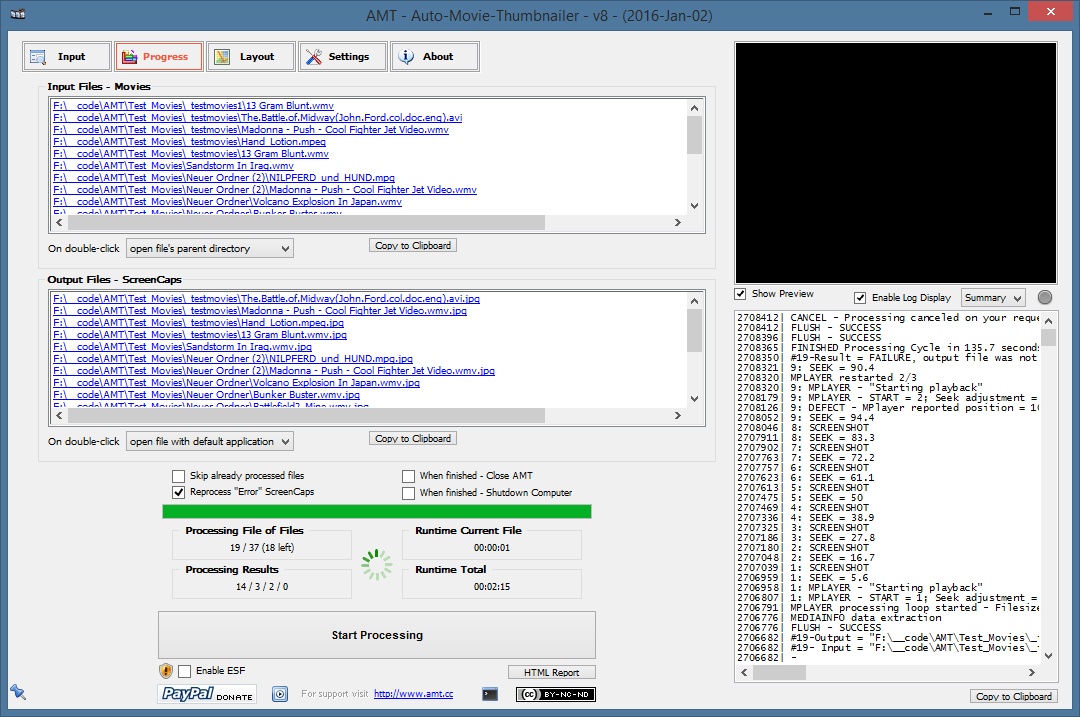
– the ability to ignore already processed files,
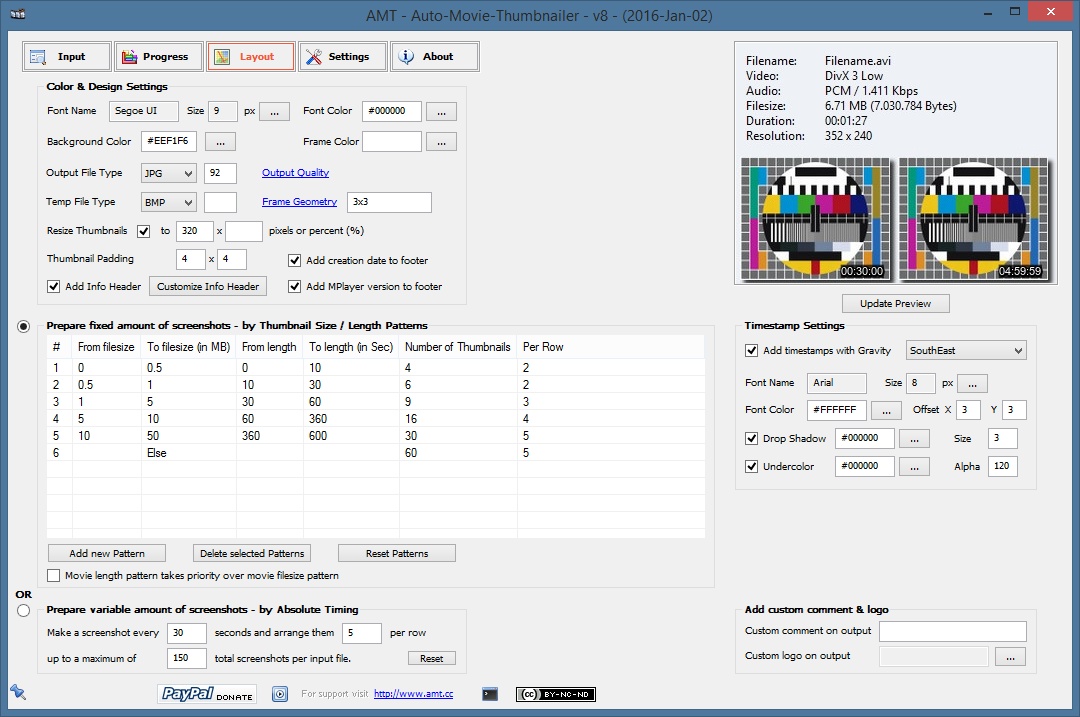
– a customizable design
– and most important, it allows you to do it in Batch Mode!
AMT is THE Batch Movie ScreenCap Creator!

The AMT – Auto-Movie-Thumbnailer is an automation GUI to batch create ScreenCaps, Thumbnail Index Pictures, Preview Pictures or Contact Sheets for any given number of movies. It supports many different input (AVI, MPG, Quicktime, Real-Media, Windows-Media,….) formats, in fact every input format that is supported by MPlayer.
Additionally AMT offers you a huge number of possibilities to customize the design and layout of the ScreenCaps.
AMT works by remotely controlling the MPlayer, some applications of the ImageMagick Suite and a MediaInfo plugin to perform the screenshoting and Picture creation.
Known Problems
Short movies might not have enough key-frames (depending on format) for multiple screenshots. E.g. if you want to have 20 screenshots per movie, but the movie only has 10 Key-frames, will get duplicate screenshots. That’s because the seek function of MPlayer is controlled by simple math. 20 screenshots means start at 2.5%, next shot 7.5%, 12.5%… if now too few key-frames are defined in the movie (during creation process), 7.5% and 12.5% might point to the same key-frame, if for example the movie has a key-frame at 5% and the next at 15%. MPlayer is only capable of seeking key-frames for certain formats.
 |
 |
 |
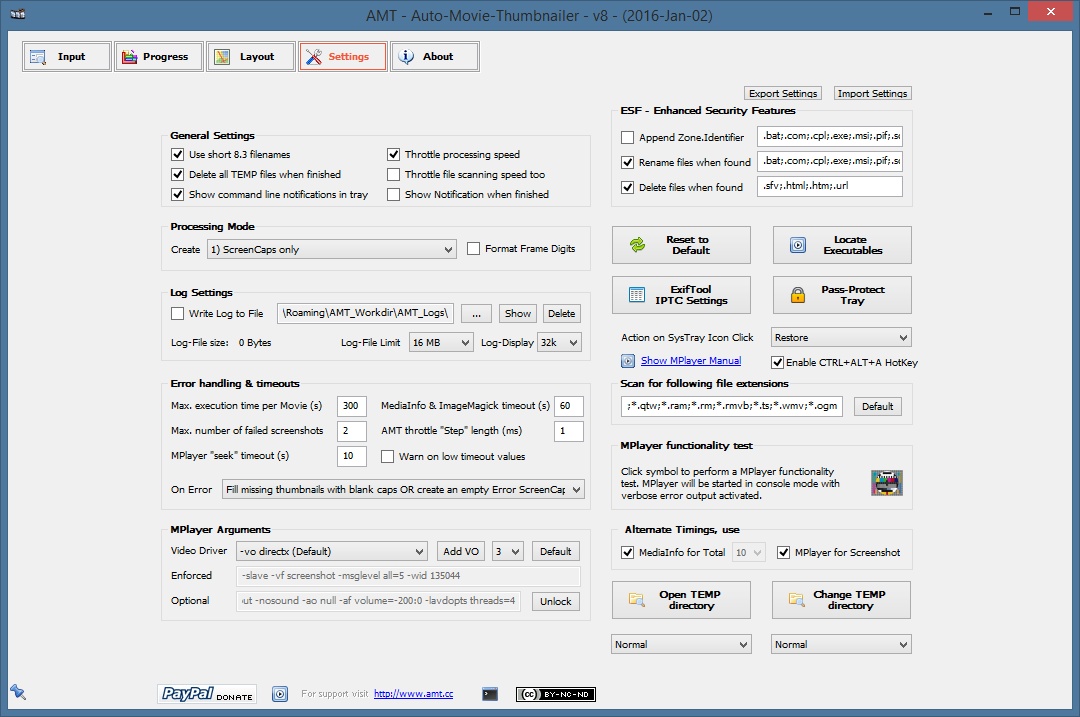 |
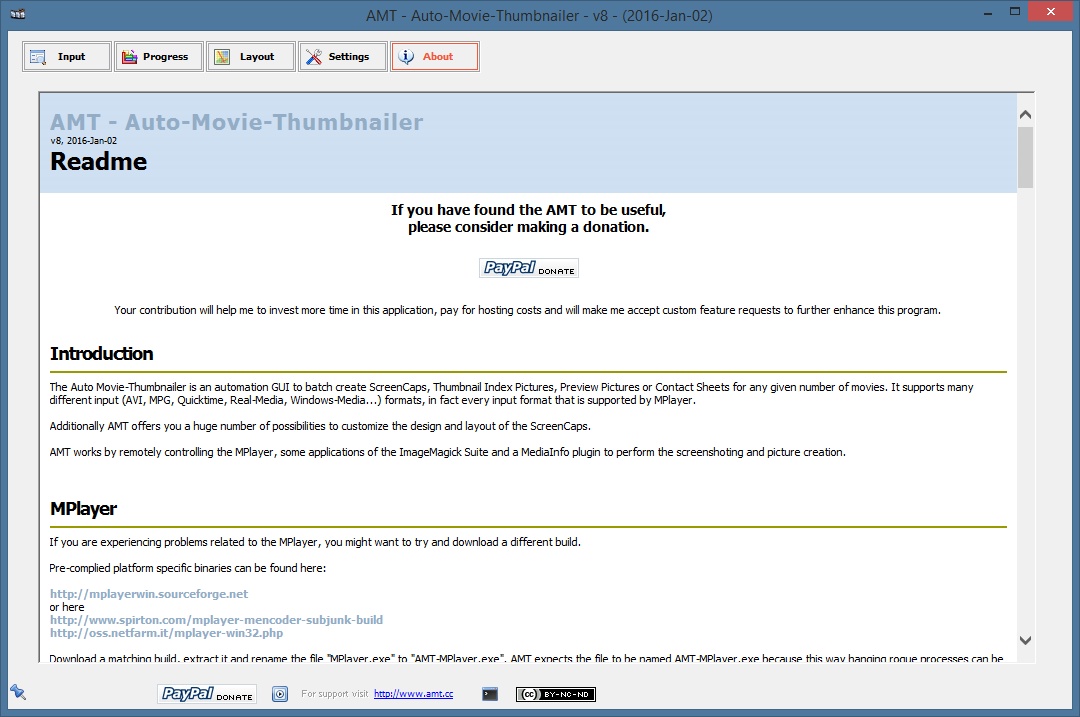 |
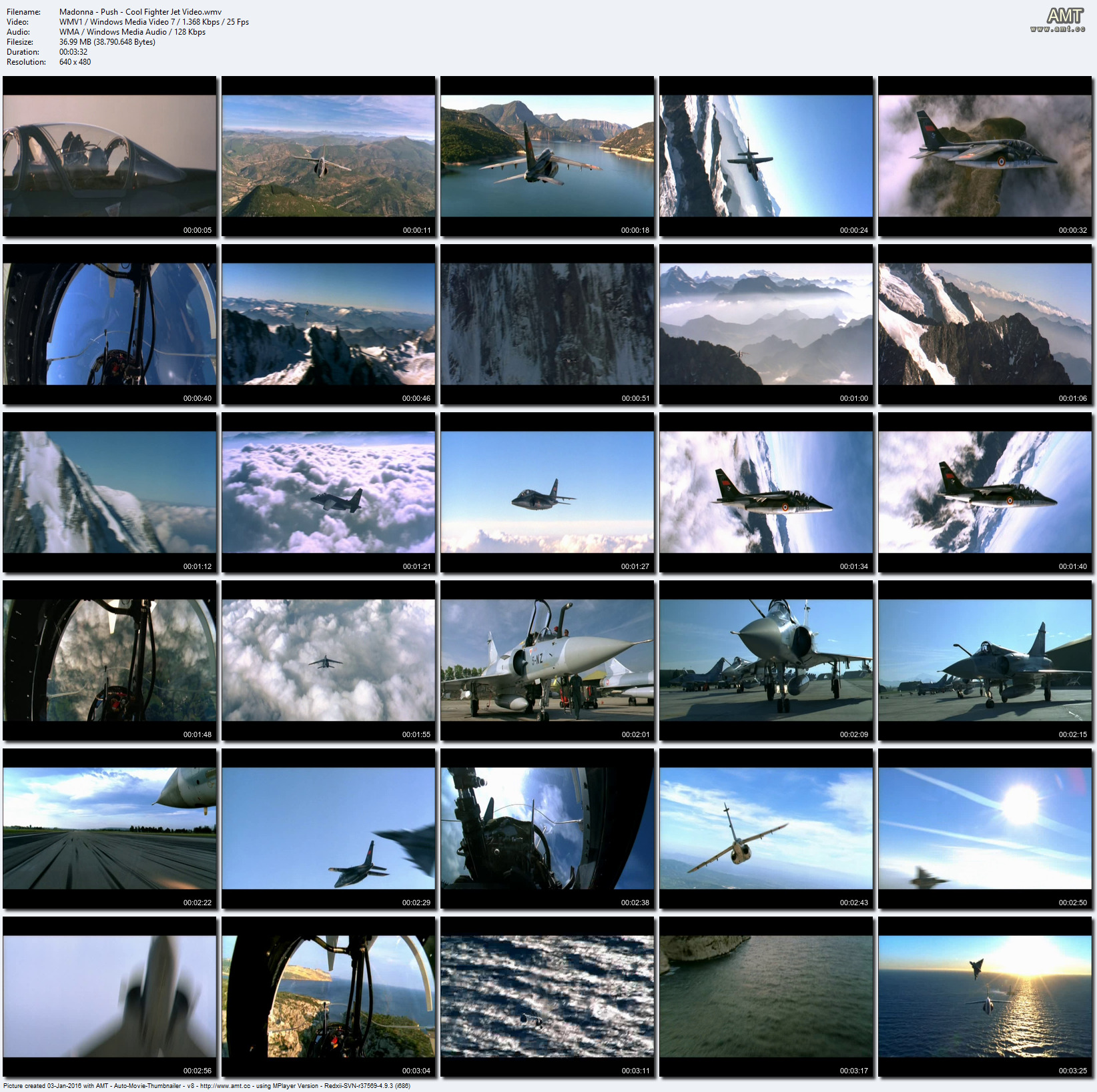 |
License
This program is freeware under Creative Commons License “by-nc-nd 3.0”, and this means, you are free to share, to copy, distribute and transmit the work under the following conditions:
- Attribution – You must attribute the work in the manner specified by the author or licensor (but not in any way that suggests that they endorse you or your use of the work).
- Noncommercial – You may not use this work for commercial purposes.
- No Derivative Works – You may not alter, transform, or build upon this work.
See also http://creativecommons.org/licenses/by-nc-nd/3.0 for details.
For any form of distribution of this software a link back to the authors website at http://www.amt.cc is required.

v14 > v15 – 2024, Oct 13
– Fixed several memory leaks
– Updated binaries
v13 > v14 – 2022, Nov 26
– Fixed tray password set by default
– Fixed error on “Show notification…” or “When finished…”
– Added success/failure messages to AMT Drag & Drop Interface
v12 > v13 – 2022, Nov 13
– Improved Save and Reload of settings
– Updated to AutoIt 3.3.16.1
– Updated all sub-binaries
– A lot of tiny changes and improvements
v11 > v12 – 2019, Dec 21
– Increased overall speed especially for HD files by using pre-scaling and improving processing functions
– Use x64 version if possible, as MPlayer x64 is much faster on huge files. Only sub-binaries are x64, AMT itself still is x86.
– x86 version contains MPlayer codec pack (not available for x64), nevertheless most files should play fine without it
– Integrated BIC code (crop and rotate) for single cap post-processing
– A lot of tiny changes and improvements
– Updated all sub-binaries
v10 > v11 – 2018, Sep 21
– Fixed – Slow processing speed, because for “Custom” header MediaInfo was extracted from every file before “Skip” check
– Fixed – Frame around single picture not displayed anymore with geometry 3×3, now set to 4×4
– Updated MPlayer to r38116
– Updated SQLite to 3.25.1
– Updated ImageMagick to 6.9.9-51-portable-Q16-x86
v9 > v10 – 2018, Sep 16
– Fixed – Errors in Win10 Treeview for network drives
– Fixed – Errors in autoupdate of treeview
– Lots of other small bug fixes and style changes
– Date and version footer now optional
– Massive changes and enhancements to “Create Single Frame Screenshot Caps” functions incl. cropping
– Added “Correct Orientation” and “Enforce Rotation to” switches
– Updated codebase to AutoIt v3.3.14.5
– Updated MPlayer to r38109
– Updated MediaInfo Dll to 18.08.1
– Updated SQLite to 3.25.0
– Updated ImageMagick-6.9.9-40
8.0 > 9.0 – 2017, Mar 04
– Fixed – Win10 – Suddenly MPlayer window was visible on PC unlocking, even if AMT was minimized
– Fixed – WinXP – Treeview “Auto-Refresh” does not work and seems to crash XP, feature disabled for XP now
– Fixed several bugs in Layout > Fixed amount of screenshots pattern logic
– In cycle “Processing File” was not reset correctly
– Added error icon to replace “No directory selected” error msgbox (less intrusive)
– Lots of other small bug fixes and style changes
– Updated MPlayer to r37926
– Updated MediaInfo Dll to 0.7.93
– Updated SQLite to 3.17.0
– Updated ImageMagick-6.9.7-1
7.0 > 8.0 – 2016, Jan 02
– Temporary file type now selectable (default = BMP = lossless)
– GUI default size increased and GUI now resizeable
– Added ExifTool support to write IPTC infos to output files
– Added optional CTRL+ALT+A hotkey to recover from tray
– Temp file directory can now be relocated after install
– Updated Treeview functions
– Fixed command line interface bugs
– Lots of other small bug fixes and style changes
– Updated MPlayer to r37569
– Updated MediaInfo Dll to 0.7.81
– Updated SQLite to 3.9.2
– Updated ImageMagick-6.8.8-10
– Updated exiftool-9.82
6.0 > 7.0 – 2014, Sep 06
– Added – Quicksave functionality for file folders selection
– Added – AMT Drag & Drop Interface
– Added – “Output Directory” options “Dedicated Output File Directory – Create Source Sub-Directory Structure” & “Dedicated Output File Directory – Create Source Full-Directory Structure”
– Added – Option to export and import all AMT settings, see “Settings” tab
– Updated – Corrected error in “Add digits to filename” functionality
– Updated – Rewrote command line interface (see “About” for changed syntax)
– Updated – Increased maximum size for thumbnail width and height setting from 3 to 4 digits (9999)
– Updated – Increased the maximum amount of variable shots from 9.801 to 99.999
– Updated – Increased total tile number to 99×999 = 98.901
– Updated – Resize Thumbnails – now accepts “Absolute size in pixels” AND “Relative size in percent”
– Updated – Tweaked overall “Single Frame PreviewCaps” functionality, added mode “2) Create multiple Single Frame Screenshot Caps”
– Lots of small bug fixes and style changes
– Updated MPlayer to r37260
– Updated MediaInfo Dll to 0.7.70
– Updated SQLite to 3.8.6
5.0 > 6.0 – 2014, Apr 06
– Fixed – Layout > “Prepare variable amount of screenshots” timings and totals were wrong
– Fixed – Individual frames were not exported correctly (see “Processing Mode”)
– Fixed – Progress Display Update / reduced flickering for labels and log edit controls
– Fixed – “Block” creation method to overcome ~32k characters limit of command-line input
– Added – Added option to use “Fixed Filename” for output / use Prefix OR Suffix to define name, one of both MUST be filled
– Added – “Output Directory” option – create ScreenCaps in “Input File Directory / Sub-Directory of Input File Directory / Parent-Directory of Input File Directory / Dedicated Output File Directory”
– Added – %Parent_Directory_Name% wildcard to output filename Prefix and Sufix fields
– Added – Treeview auto-update
– Added – Several “Processing Mode” indicators to tab “Progress”
– Added – Combo “Summary/Extended” for log display, enhanced log entries written to log
– Added – “Settings” > added “Add VO” button to allow setting of custom Video Driver
– Updated – “Add creation date to footer” switch
– Updated – “Add MPlayer version to footer” switch
– Updated – Total tile number = 99×99 = 9.801
– Updated – Changed “Autoenumerate filename” option to check for file existence first and only to create unique filenames
– Updated – Improved all log functions and calls
– Lots of small bug fixes and style changes
– Updated MPlayer to r37051 – grey screens for certain mpg files fixed
– Updated MediaInfo Dll to 0.7.68
– Updated ImageMagick to 6.8.8-10
– Updated SQLite to 3.8.4.3
4.0 > 5.0 – 2013, Dec 23
– Fixed – Movie length / “Duration” error for some files
– Fixed – MPlayer does not work with too many threads allocated, added a default limit of 4
– Fixed – Windows Shutdown arguments wrong, triggered a restart not a shutdown
– Fixed – On Win8 AMT stops rendering if PC is locked and -vo=direct3d > changed default -vo > now XP, Win8 and Win8.1 use default -vo=directx, Win Vista and Win7 -vo=direct3d (to avoid problems with DWM / Aero)
– Added – Timestamp customization options (see “Thumbnail Preview – Timestamp Generation”)
– Added – Option to auto-update Folder Treeview
– Added – Option for variable / timed-screenshoting / to “Make a screenshot every X seconds”
– Updated – Folder Treeview > added option to cancel refresh when (slow) network folders are included
– Updated – Better detection of Video and Audio bitrate (see “BitRate_Nominal/String” & “SamplingRate/String”)
– Updated – Moved “Shutdown when finished” / “Notify when Cylce finished” to “Progress” tab
– Updated – Removed “AMT-Previewer.exe” and related functions
– Lots of small bug fixes and style changes
– Updated MediaInfo Dll to 0.7.65
– Updated MPlayer to r36541
– Updated SQLite to 3.8.2
3.0 > 4.0 – 2013, Sep 29
– Fixed default video driver bug, prevented AMT to work correct on some graphic cards (-vo now defaults to “directx” for XP and “direct3d” for all newer OS)
– Fixed – “On Error created an empty ScreenCap replacement” and “Fill missing thumbnails with…” switches did not work correctly
– Updated – Removed Preview and Log screens from “Settings” tab
– Updated – Increased font size for “group control” labels
– Updated – Rearranged controls on “Settings” tab
– Fixed – Removed trailing “\” from $sLogfileLocation, prevented update of log filesize
– Fixed – “Fill missing thumbnails with blank caps” => “Blank Cap” needs to be resized to match normal thumbnail size (resp. ratio)
– Updated – Relocated “Reprocess Error Screencaps” back to “Progress” tab
– Updated – Added icons to some “Settings” buttons
– Updated – Ran “ZZZ_Calculation_Optimizer_v01.au3” to remove all calculations in control positioning
– Updated – Win8 – Changed default font quality from 4 to 5 for a clear output ($s_TNC_Thumbnails_Font_Quality_Default)
– Updated – Added COM error handler
– Updated – Added “MPlayer functionality test” to “Settings” tab
– Updated ImageMagick to 6.8.6-7
– Updated MediaInfo Dll to 0.7.64
– Updated MPlayer to r36459
– Updated SQLite to 3.8.0.2
2.1 > 3.0 – 2013, Jun 23
– Added optional thumbnail pattern selection by movie duration (instead of the default selection by filesize)
– Fixed thumbnail pattern definition workflow
– Added option to pause processing
– Added more command actions for click on SysTray icon (restore / pause / exit)
– Made the “Info Header” labels (“Filename:”, “Duration:”…) optional per row
– Fixed MediaInfo wildcards for filename Prefix & Suffix
– Fixed several output renaming bugs
– Plus lots of minor tweaks and bug fixes
– Updated MediaInfo Dll to 0.7.63
– Updated MPlayer to r36349
– Updated SQLite to 3.7.17
2.0 > 2.1 – 2013, Mar 22
– New command-line switches (add n:m files/directories to processing queue, AMT_Run_On_Start, AMT_Start_Minimized)
– MediaInfo wildcards for filename Prefix & Suffix (e.g. add length, resolution to filename)
– Added optional output format PNG (to existing JPG format)
– Added optional “MPlayer Log” Window (to see whats going on under the hood)
– Added option to customize (translate) the “Info Header” labels (“Filename:”, “Duration:”…) on the output
– Fixed some few minor bugs
– Updated ImageMagick to 6.8.3-9
– Updated MediaInfo Dll to 0.7.62
– Updated MPlayer to r36021
– Updated SQLite to 3.7.16
1.9 > 2.0 – 2012, Nov 07
– Fixed an issue with the Uninstaller
– Tweaked Workflow
1.8 > 1.9 – 2012, Nov 02
– Upgraded Binaries (ImageMagick, MPlayer, MediaInfo)
– Tweaked Workflow
– Switched to save settings to a SQLite database instead of an Ini-File (much faster startup and processing)
– Fixed Processing of Movie-Files with Unicode Filenames
– Fixed Display of Unicode Filenames in Screencaps
– Added option to export all caps separately
– Added an option to throttle processing speed (default on) to prevent CPU maxing out
– Enhanced options for Screencap Font selection
1.7 > 1.8 – 2012, Apr 02
– Upgraded Binaries (MPlayer, MediaInfo)
– Tweaked Workflow
– Added option to create “Single Frame Preview Caps”
– Added option to create “ScreenCap Report”
– Added option to create “PreviewCap Report”
1.6 > 1.7 – 2012, Feb 14
– Upgraded Binaries (MPlayer, MediaInfo)
– Tweaked internal workflow
– Added command line interface support (check “About” tab for details)
1.5 > 1.6 – 2011, Dec 31
– Added some functionalities
– Added some layout options
– Upgraded Binaries (MPlayer, MediaInfo)
– On Vista+ Aero is not disabled by default anymore (dependency to used video output driver)
– Released Source
1.4 > 1.5 – 2011, Oct 23
– Fixed pattern bug
– Added some functionalities
– Added some layout options
– Upgraded Binaries (MPlayer, MediaInfo)
1.3 > 1.4 – 2011, Sep 04
– Redesigned GUI
– Added some functionalities
– Added some layout options
– Upgraded Binaries (MPlayer, MediaInfo), should solve AMT hanging on certain movie files
– Tweaked Workflow
1.2 > 1.3 – 2011, Aug 10
– Upgraded Binaries (MPlayer, MediaInfo), should solve AMT hanging on certain movie files
– Added some layout options (cap padding, info header now optional)
– Updated Treeview
– Tweaked Workflow
1.1 > 1.2 – 2011, Apr 13
– Fixed the UAC and DEP issues on Vista+ systems
– Added option for custom logo or comment
– Upgraded Binaries (MPlayer, ImageMagick, MediaInfo)
– Updated Treeview
– Tweaked Workflow
1.0.7.1 > 1.1 – 2010, Oct 15
– Implemented Win7 compliance, AERO disabled on program start
– Upgraded Binaries (MPlayer, ImageMagick, MediaInfo)
– Updated Treeview
– Tweaked Workflow
1.0.6.3 > 1.0.7.0 – 2009, Aug 17
– Changed log file max size truncation logic
– Upgraded SubBinaries from v7 to v8 (2009-Aug-17)
– Updated Treeview: Now restores previous selection states after program restart
– Added frequent check for AMT-mplayer.exe crash window
– Changed style of input file search progress bar to MARQUEE
– Removed _ReduceMemory() function
– Changed startup timer for AMT-Watcher from 2*5 seconds to 2*15 seconds
– Changed style for custom progress GUI
– Fixed an issue, if total file-location length of temp-files in AMTWorkDir is > 256 characters
– Skip of file creation with a total file-length > 252 characters (.jpg appended > 256 characters) in File search function
1.0.6.2 > 1.0.6.3 – 2009, Jun 22
– AMT can now be closed while processing
1.0.5.5 – 2009, Jun 11
– Trayicon always visible
– Trayicon blinks while processing
– Imagelist for Treeview icons now also recreated on refresh (occasionally got lost)
It works fine on the XP-SP3-32bit, Win7-64bit and Win8-64bit machines I’ve tested it on. If you find bugs please let me know.
 |
 |
 |
 |
 |
AMT was created with AutoIt, visit the forum at
Disclaimer
This program is distributed in the hope that it will be useful, but
WITHOUT ANY WARRANTY
The Author of this Software expressly disclaims any warranty for the SOFTWARE PRODUCT. The SOFTWARE PRODUCT and any related documentation is provided “as is” without warranty of any kind, either express or implied, including, without limitation, the implied warranties or merchantability, fitness for a particular purpose, or non-infringement. The entire risk arising out of use or performance of the SOFTWARE PRODUCT remains with you.
NO LIABILITY FOR DAMAGES
In no event shall the author of this Software be liable for any damages whatsoever (including, without limitation, damages for loss of business profits, business interruption, loss of business information, or any other pecuniary loss) arising out of the use of or inability to use this product, even if the Author of this Software has been advised of the possibility of such damages. Because some states/jurisdictions do not allow the exclusion or limitation of liability for consequential or incidental damages, the above limitation may not apply to you.
AMT – Binaries
AMT utilizes some external binaries. All binaries are fully functional and can be used as standalone programs. They are only provided with this installer for installation convenience. The SubBinaries AddOn-Package consists of the following applications:
MPlayer
GNU GENERAL PUBLIC LICENSE, Version 2
MediaInfo
This program is freeware (GLPv3)
ImageMagick
The ImageMagick license is compatible with the GPL.
A copy of the license agreements for these programs can be found in the respective installation folder. The AMT license does not cover these programs. All copyrights remain with the respective authors.
SQLite
All of the deliverable code in SQLite has been dedicated to the public domain by the authors and does not require a license.




Nevermind, I just found the “Update existing if applicable” option which seems to be working. Thanks again for this great program. You can delete these comments 🙂
Hi Dustin,
glad you like AMT :)!
In “Update existing file if applicable” AMT checks if movie filetime is younger than screencap filetime, if so it deletes and re-creates the screencap.
If you check the ‘Reprocess “Errors”‘ checkbox on the “Progress” tab, AMT checks if the existing file is an”Error” file, if so it deletes and re-creates the screencap.
Maybe the second option is more what you’re looking for.
Best Regards
Karsten
Hello, I have been using this tool for years and it is really great. However, I have one small issue with the newest version. It now creates a 1KB ERROR image on failure, and I cannot find any option to turn this off completely. I would like to retry these failed videos on the next run (it will usually complete successfully), but they will be skipped until I manually delete these ERROR images. An “On Error” option, to ignore and retry on the next run would be wonderful if possible. Thank you for this program!
I’ve started getting errors on youtube videos. Here’s one:
4931172| #1- Input = “G:\youtube\_doit\bl-brn\ambidextrous superman 123\testvideonow.mp4”
4931172| #1-Output = “G:\youtube\_doit\bl-brn\ambidextrous superman 123\testvideonow.jpg”
4931217| ERROR possible – 8.3 ShortName the same as LongName, AMT might not process file if filename length > 260, and it is 66 G:\youtube\_doit\bl-brn\ambidextrous superman 123\testvideonow.mp4
4931217| MEDIAINFO data extraction
4931218| _MediaInfo_Extract-1: 1
4931239| _MediaInfo_Extract-3-b: 1
4931240| _MediaInfo_Extract-4:
4931240| _MediaInfo_Extract-5: 839843
4931240| _MediaInfo_Extract-6: 0
4931240| MPLAYER processing loop started – Filesize = 134.45MB; Amount of Shots = 12; Pictures per Row = 4; Pictures per Column = 3; Use Shortnames = True; Prepare fixed amount of screenshots = True; Pattern Time Priority = True; Duration in Seconds = 839
4931323| 1: MPLAYER – START = 1; Seek adjustment = 0
4931502| 1: MPLAYER – EOF, end of file reached-1
4931606| #1-Result = FAILURE, output file was not created
4931618| FINISHED Processing Cycle in 1 seconds – 2025-03-26, 17:49:31 – Files: 1 / 1 (0 left) – Result: 0 / 0 / 1 / 0
This is one of several errored files I have gotten in the past few days. The videos themselves are not new on the site but my download of them is.
Hi G E,
there’s no clear and obvious error in the log. My first guess would be, that the input files are somehow corrupt. If you could provide a sample which does not work, I would take a deeper look.
Best Regards,
Karsten
Hi, please consider an option for parallel processing.
Useful for cases of generating thumbnails for thousands of series episodes (Star Trek, etc).
Right now it takes 20 seconds per episode and only one thread using 10% CPU of a single core is running.
AMT even doesn’t want to start multiple times, so I could parallelize it manually over different series/shows.
Hi Thomas,
glad you like AMT! Sorry, but parallel running of multiple instances is not possible. Implementing it would take too much effort for this hobby project, as many of the logic checks for the running background processes are based on the executable filenames (e.g. does “AMT-mplayer.exe” still exist?), and I myself never had the need to implement parallel processing (maybe because my own computer is too slow and already too busy with a single instance). Just let AMT run in the background 24/7, that’s still 4.320 episodes a day :).
Best Regards
Karsten
Hello,
Added on JeTelecharge.com 😉
Best wishes !
Merci bien :)!
I tried to message for support, just curious is there any other way to ask for assistance?
I’ve sent you an email, maybe check your spam folder.
Thanks for providing great software!
I have tried almost all similar software and AMT is the best.
I really hope that one day the “Known Problem” of can only capture keyframes will be resolved.
Hi Richard,
glad you like my software :)! I don’t think it will be solved, as it is something inherent in the MPlayer and how it performs seeks in movies. But sadly the MPlayer development has stalled, so I don’t expect any updates from them anymore. Maybe I’ll have to switch to mpv in the future, and maybe that solves the issue :).
Best Regards
Karsten
Hey KaFu!
It did smoothly! I had to convert those HEVC before using AMT, this helps a lot 🙂
I’ll continue using it and report back if I notice something. Thanks again!
Hey KaFu!
I’ve been using the V14 so far and it works flawlessly.
I’ve got a question though, do you think we can make it work with HEVC encoded videos? This codec is becoming popular lately and as the Mplayer is unable to take screenshots, the files are been skipped.
Tried to look for a newer version of Mplayer but yeah, the binaries offered on the Mplayer site are from 2019 and never versions are Compile-them-yourself version lol.
Any suggestion on how to update this component in AMT?
Regards!
Hi Patt,
glad to hear that AMT is useful to you :)! My current Beta I run with MPlayer r38407, downloaded from here:
https://oss.netfarm.it/mplayer/
Let me know, if that solves the issue.
Best Regards
While redoing the thumbnails for a whole bunch of videos, ran into a weird issue. AMT will only be able to process 148 files. Any files after the 148 mark, thumbnail file is created. This is reproducible.
After the error, rerunning AMT (close and reopen), AMT will continue to process the files, but again only up to 148 files.
The different executables were replaced with newer one when possible:
– MPlayer-x86_64-r38407+g10a56363a7, worked without issue
– ImageMagick-7.1.1-29-portable-Q16-x64, convert.exe works fine, but the montage.exe threw an error. Going back to ImageMagick-6.9.13-7-portable-Q16-x64 allow montage.exe to work
– MediaInfo_GUI_24.01.1_Windows_x64_WithoutInstaller, threw an error and could not be loaded
– exiftool-12.77 worked
After the executable updates, still have the same issue at 148 videos mark.
Looking into the TEMP folder, it looks like the individual screenshots were created (shotxxx.png and shot***_ts.bmp). Montage.exe appears to be working as index_pic_temp.bmp and final_Header.bmp are also created.
But the log show the error of (this is from a folder of 603 vids):
FINISHED Processing Cycle in 11027 seconds – 2024-02-29, 05:52:23 – Files: 603 / 603 (0 left) – Result: 148 / 0 / 301 / 154
05:52:23-227| #603-Result = FAILURE, output file was not created|LX=”E:\vids\RCT-807.1080p.thumb.jpg”
05:52:23-226| ERROR – Thumbnail Creation Error #127
05:52:23-119| 0: MONTAGE – FINISH – Block-1; “index_pic_temp.bmp”|LX=File D:\temp\AMT_Temp\screenshots\index_pic_temp.bmp found
Hi tinman,
the cycle ended successfully with “FINISHED Processing Cycle in 11027 seconds – 2024-02-29, 05:52:23 – Files: 603 / 603 (0 left) – Result: 148 / 0 / 301 / 154”.
That means all 603 files have been processed, 148 with success, 0 were defect, 301 failures and 154 skipped (normally means output already exists).
Best Regards
Karsten
Hey Karsten,
is it possible to include a MIME-type check? It looks like AMT is currently only checking the file extension. Sometimes the file extension doesn’t match the mime type.
Best,
Marcel
Hi Marcel,
the file extension is only the first step. I also check with MediaInfo if the “VideoCount” > 0 and if “StreamKind” = “Video”, and process the file only if both are true. Do you have any issues with movies not working?
Best Regards
Karsten
AMT-13
https://www.virustotal.com/gui/file/f9ac6458ee4407333200b9a26088d4ce2f262a29078c070d985f67c28df50045/behavior
AMT-14 https://www.virustotal.com/gui/file/4d6ed282c555e8321188ce903c96731153dd97945d051a5dcf26cc551fbf9c32
Sieht nicht gut aus. Kannst du das erklaeren? Alles hier von deiner Seite gezogen.
All my programs are coded in AutoIt, and lazy AV vendors just mark the whole language as potentially malicious.
https://www.autoitscript.com/forum/topic/209561-are-my-autoit-exes-really-infected
Also look at the names, none of the major vendors flags my code as malicious.
In case of doubt download the source and compile for yourself, can’t do anything more about it.
I would LOVE a feature where a waveform of the audios amplitude can be displayed, sized and included somewhere on the image file AMT generates.
the ability to resolve and place the waveform at the header, footer or perhaps divided up along the underside of each row according to the time division of the images on that row would be awesome and useful.
A Contact sheet helps you locate scenes, but audio is a part of that process.
A good idea, but sorry out of question for me. Audio analysis is a totally different thing than picture extraction, and as long as I don’t have a need for myself, I won’t go that way.
Hey Karsten,
Have you planned releasing a portable Version? I’d like to include AMT in a portable script package. 🙂
Best,
Marcel
Hi Marcel,
glad you like AMT and consider to include it in you package :), but not, sadly not. The installer is quite complex, and making AMT portable would certainly be possible, but would take to much time from me.
Best Regards
Karsten
What does seem to work is that if you take the installed directory in “Program Files” and copy it to another detestation, AMT still seems to work just fine with the defaults. The “temp” directory is automatically set to “$AppData\Roaming\AMT_Workdir\”. Though if you delete AMT there will be left-overs on the local drive to be cleaned manually.
Hello Kafu! Long time no write you, Glad to see you are doing well and the AMT got a new update =) Been using the V13 you updated for me since 2020 flawlessly! I’ll let you know if I see anything on V14.
Thanks for everything!
Still fixing many tiny bugs I find myself and which are reported, looking forward to yours :)!
Best Regards
Karsten
Hello,I wonder if it’s possible to use the GPU to speed up the thumbnail process. Is it possible?
Hi Dan,
I’ve checked but couldn’t find a way to enable GPU usage for MPlayer on windows. If it’s possible and anybody knows how to I’ll happily implement that into AMT.
Best Regards
Made the mistake of minimizing this program without knowing that restoring it from the system tray was password protected.
Ups, sorry, good catch :), I’ve set my own settings as default, which for the PW is clearly a failure.
I also found another tiny bug (when you turn on the “Show Notification when finished” or “When finished – Shutdown” checkboxes), I’ll post an updated v13.1 this evening or tomorrow.
Thanks for reporting!
For those using this program who want AV1 video thumbnails, I have found a solution. Download a more recent version of MPlayer like MPlayer 1.5 which is compiled with FFmpeg 5.0. Extract the download and rename MPlayer.exe to AMT-MPlayer.exe. Next open AMT and go to settings->locate executables to find the path where AMT stores it’s copy of MPlayer. Replace that version with the new MPlayer 1.5 and Voila, AV1 support!
Hi Clyde2,
thanks for the tip, a good one I myself do regularly! I use the most recent version of MPlayer provided here: https://oss.netfarm.it/mplayer/
And also thanks for the nice review on videohelp.com :), never understood those bad results there.
Best Regards,
Karsten
Big fan of AMT, however it doesn’t generate thumbnails for AV1 content (from youtube). Will this be supported in the future?
Hi! Thanks for this great app!
I would like to know if it’s possible to run it with command lines ?
If yes, where could I have the instructions list ?
Thank You
Hi there, glad you like it :).
Yes, AMT has a command line interface. Take a look at the “About” tab and scroll down to “Command Line Interface” for help on the syntax.
Regards, Karsten
In the current version 12 (21-Dec-2019) there is a serious problem under current Windows 10 with very extensive directories:
In a directory on C: (SSD drive) in another subdirectory of ..\user\ are the number of 24532 files. In addition, there are 293 other subdirectories in it. Displayed in the file tree under
[Input]
Recursive Search ON
Exclude system files ON
only the first 14 subdirectories instead of 293 subdirectories.
After executing some movie thumbnails in a completely different directory and clicking on [Cancel Processing], clicking on [Input] or one of the other main buttons (they are NOT grayed out) is not possible anymore!!!
—
Furthermore, help for setting up a RAM drive is offered during installation. Here an updated help would be perhaps of advantage, which represents the only still smaller advantages of a RAM disk in the comparison to the SSD … and offers if necessary directly the RAM disk installation 🙂
Otherwise very good and useful software!!! Thanks for this freeware!!!
===================================================
THE SAME IN GERMAN:
In der aktuellen Version 12 (21-Dec-2019) gibt es unter aktuellem Windows 10 mit sehr umfangreichen Verzeichnissen ein gravierendes Problem:
In einem Verzeichnis auf C: (SSD-Drive) sind in einem weiteren Unterverzeichnis von ..\user\ die Anzahl von 24532 Dateien. Zusätzlich sind darin 293 weitere Unterverzeichnisse. Angezeigt werden im Dateibaum unter
[Input]
Recursive Search ON
Exclude system files ON
nur die ersten 14 Unterverzeichnisse statt 293 Unterverzeichnissen.
Nach Ausführung einiger Movie-Thumbnails in einem ganz wo anders liegenden Verzeichnis und Klick auf [Cancel Processing] ist ein Klick auf [Input] oder einen der anderen Haupt-Buttons (sie sind NICHT ausgegraut) nicht mehr möglich!!!
—
Des weiteren wird bei der Installation die Hilfe zur Einrichtung eines RAM-Drives angeboten. Hier wäre ein aktualisierte Hilfe vielleicht von Vorteil, die die nur noch geringeren Vorteile einer RAM-Disk im Vergleich zur SSD darstellt … und ggf. gleich die RAM-Disk-Installation anbietet 🙂
Ansonsten sehr gute und nützliche Software!!! Vielen Dank für diese Freeware!!!
Hi Dilara,
I fixed something in the “User” dir parsing logic some time ago (removed over-engineered optimizations), please try latest Beta (just exchange AMT.exe):
https://funk.eu/wp-content/plugins/download-monitor/download.php?id=259
Otherwise please post either the full (anonymized) path names and sub-dirs or use an email address I can contact.
Regards
Karsten
I am having the same problem SFluery did in Feb 2020 I think. All my headers have stopped showing up. What does this have to do with the amount of free space on the HDD?