



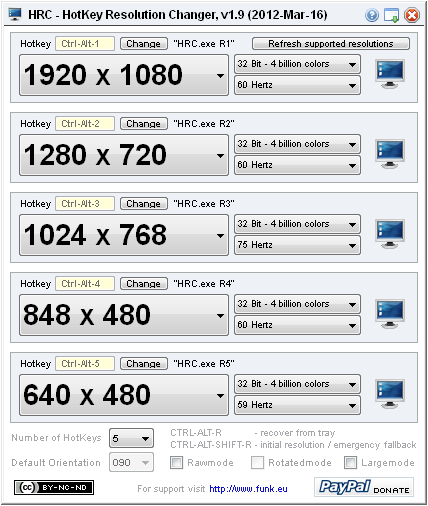
Do you also have a multi monitor setup and are annoyed
with always having to change the resolution manually?
Then HCR will be as helpful to you as it is to me…
– Starts minimized (add shortcut to StartUp to start with windows)
– Sits silently in the tray
– Define 2 to 9 shortcuts for different resolutions
– Switch resolution with just a keypress!
– The HotKeys can be customized
License
This program is freeware under Creative Commons License “by-nc-sa 3.0”, and this means, you are free to share, to copy, distribute and transmit the work under the following conditions:
- Attribution – You must attribute the work in the manner specified by the author or licensor (but not in any way that suggests that they endorse you or your use of the work).
- Noncommercial – You may not use this work for commercial purposes.
- Share Alike – If you alter, transform, or build upon this work, you may distribute the resulting work only under the same or similar license to this one.
See also http://creativecommons.org/licenses/by-nc-sa/3.0 for details.
For any form of distribution of this software a link back to the authors website at http://www.funk.eu is required.
Version 1.0 should fix the UAC prompt bug.
Version 1.1 fixes a DEP (Data Execution Prevention) issue which made HRC silently crash on start and a hotkey assignment bug, which made the set hotkeys not being saved.
Version 1.2 should fix another “save settings” issue
Version 1.3 fixes a stuck command key (ctrl, alt, win, shift) and another “save settings” issue
Version 1.4 fixes a HotKey assign problem
Version 1.9 added display rotation support
Version 2.0 added some additional command line switches (check help-screen / question mark on main GUI)
Version 2.1 fixes hotkeys stop working after some time using HRC on a Win7 machine. The hooks are de-activated and re-activated every three minutes in the background now.
HRC is not able to deal with multi-display settings like different resolutions and extended or mirrored displays yet. Those settings still have to be made manually.


|

|

|
|

|

|

|
HRC was created with AutoIt, visit the forum at
Disclaimer
This program is distributed in the hope that it will be useful, but
WITHOUT ANY WARRANTY
The Author of this Software expressly disclaims any warranty for the SOFTWARE PRODUCT. The SOFTWARE PRODUCT and any related documentation is provided “as is” without warranty of any kind, either express or implied, including, without limitation, the implied warranties or merchantability, fitness for a particular purpose, or non-infringement. The entire risk arising out of use or performance of the SOFTWARE PRODUCT remains with you.
NO LIABILITY FOR DAMAGES
In no event shall the author of this Software be liable for any damages whatsoever (including, without limitation, damages for loss of business profits, business interruption, loss of business information, or any other pecuniary loss) arising out of the use of or inability to use this product, even if the Author of this Software has been advised of the possibility of such damages. Because some states/jurisdictions do not allow the exclusion or limitation of liability for consequential or incidental damages, the above limitation may not apply to you.




Amazing software. Is there anyway to disable or remap the Control-Alt-R? I use Colemak keyboard layout and once a day while playing CS I’ll be holding Control to crouch, Alt to push-to-talk, and R (S on Qwerty) to move backwards. Thanks!
It is possible, but I’ve updated the code the last time 11 years ago. I provide the source, please test yourself.
Thank you very much for creating HRC! This tiny clean utility works perfectly on my 3440×1440 ultrawide monitor. I can quickly switch between preset resolutions via custom hotkeys, which saves me tons of trouble when running old incompatible games. The emergency reset shortcut is such a thoughtful design. Really appreciate your great work!
Thank you for making this software, it is very convenient to use, but now I have encountered a problem. After I rotated the monitor 108°, the function stopped working and gave the following error code:
Error function call:
ChangeDisplaySettingsEx 1
Error code:
-2 (DISP_CHANGE_BADMODE)
Hi Ray, glad you like it. HRC just uses Windows standard API, DISP_CHANGE_BADMODE means you’ve requested a change not supported by Windows, can’t do anything about it.
Thanks for making this tool!
I’m having some trouble selecting certain resolutions. Are there some invisible restrictions?
I have a 3440×1440 monitor and would love to run games at 2560×1440, but there is no option for that. Is this a bug or something I can fix?
Hi, HRC only offers resolutions reported as valid by a standard Microsoft api. If it’s not in the list, HRC can’t change to it. There’s an excellent product by Nirsoft, maybe give that a try: https://nircmd.nirsoft.net/setdisplay.html.
bbe
Does the HRC software from this website still work well on the latest Windows versions?
Hello. Do you know how to make it NOT override the AMD Radeon Software Display options, specifically ”Scaling Mode – Center”?
Hi, no, sorry, I don’t know.
Hi there. is there any way to set this up with a dual screen setup? Like to change them individually instead of changing them together at the same time to the same resolution like its doing with me?
Hi there, no, sorry, HRC can not handle multiple monitors. Always had that on the list, but until now never found the time to implement.
Hey KaFu the Issue I had with the program is now fixed, the OS had a little problem I ran Tron script everything is all good now. the program works great.
Thanks a lot for your feedback, that’s good to hear :)!
Hey I’m starting to have some issue with the program on windows 11 23h2. using the the hotkeys takes longer to do any changes. I have to keep spamming the hotkeys until it changes display. is there any fix??
Hi,
sorry to hear that, but the latest version of HRC is as of 2012, developed on and for Win8. I’m really astound that it worked as good as it did until today.
Maybe I’ll update it in the future, but please don’t expect updates anytime soon.
Best Regards
Is it possible to implement hotkey combos? Thanks for the software it’s musthave for DSR/DL-DSR
Awesome Program! works great with Windows 12 (64). One question. Can I change the resolution from the command line? I have one app that needs to run 2560×1440 otherwise I use 1920×1080 and I was hoping to make a .bat file to run it and change it back.
Thanks
RJ
Great you like it :). Yes, take a look at the help, something like “hrc.exe r2 /exit” should work.
Best Regards
Thank you. The program is my trusted partner.
Can you please kindly show the aspect ratio, in addition to the pixel resolution?
3240/2160 (1.78)
2560/1600 (1.60)
2560/1440 (1.78)
1920/1080 (1.78)
etc.
This will help choosing the suitable upscaled resolutions for a monitor.
HRC causes input latency from just running, been having issues for the past 3 years and finally found what caused it.
if you play competetive games like CS2 or super high precision games like rythm games avoid this tool.
Hey just a question will this open automatically open after a restart or fresh open from my laptop?
To start it on restart, please add a shortcut to your Autostart folder. When started by default it will sit in the tray and not show the GUI, but hotkeys will work nevertheless.
Hello!
ive downloaded the program but when i run it nothing happens, i get the warning but after that nothing, it does show up in taskbar.
Hi Tormod,
click on the new icon in the tray, there you’ll see how the hotkeys are set-up and activated.
Best Regards
Karsten