




 (42 votes, average: 4.40 out of 5)
 Loading...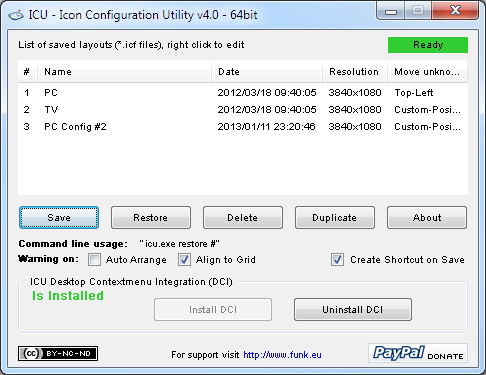
Restore your desktop when the icons get “rearranged”.
Melba23 and I found we were working on very similar ideas to restore the Desktop icons to their normal place if they became “rearranged”. Vista seems to like this doing on occasion just for fun – but we all know some applications and games which change the display resolution or move icons around. This annoys “tidy” people who like their desktops arranged “just so” – I am particularly thinking of this desktop when I say that! 🙂
We combined efforts and here is the result of our labors.
Operation is easy – press “Save” to store a particular configuration and “Restore” to reset the icons to the saved positions in the selected configuration file. “Delete” allows you to remove unwanted configuration files from the list. There is a command line option so that the restoration can be run via HotKeys if required (that is why the script warns that it should be compiled for full functionality). You can decide what to do with any icons that have been added since you last saved the configuration file – the default is to put them in the top-left corner, but you can also banish them way off-screen or, more sensibly, specify a location for them.
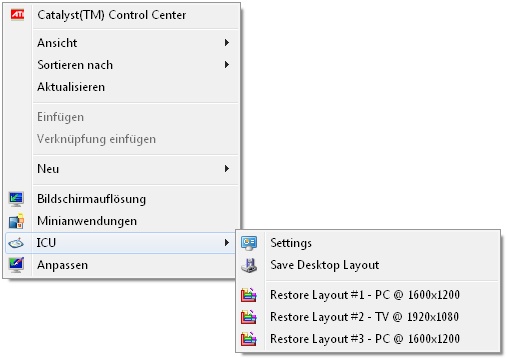
A new feature as of ICU v3.4 is the optional Desktop Contextmenu Integration (DCI) for Win7 (Win7 only because Microsoft implemented an easy way to do this through the registry as of this release).
Used AutoIt Versions
- AU 3.3.2.0 up to ICU 2.3
- AU 3.3.6.0 up to ICU 2.4
- AU 3.3.6.1 up to ICU 3.4
- AU 3.3.8.0 up to ICU 3.5
- AU 3.3.8.1 up to ICU 5
- AU 3.3.14.5
Version 3.1 should fix the UAC prompt bug
Version 3.3 should fix the empty save file bug
Version 3.4 Win7: Admin rights no longer needed for DCI
Version 5.0 Win8 compatibility for DCI

v5 > v6 – 2018, Sep 16
– Updated codebase to AutoIt v3.3.14.5
4.0 > 5.0 – 2013, May 24
– Improved Win8 compatibility (esp. Desktop Contextmenu Integration / DCI)
– Added “minimized” command line switch (to start GUI minimized to tray / autostart with windows), see program “About” for details on command line switches
– Added Tray Menu (esp. useful for Win XP) > see “minimized” switch. Also pressing ESC or minimizing the program will send ICU to the system tray now
– Added “toggle” command line switch
– Added “restore %resolution%” and “savereplace %resolution%” command line switches
3.5 > 4.0 – 2013, Jan 11
– Added new method for “Unkown Icon” handling: Top-Left|Bottom-Right|Custom Position|Ask per Icon|Off-Screen
– “Custom Position” and “Ask per Icon” now work by selecting new position with mouse
– Added new command line parameters (see “About” in program for details): restore, autosave, save, savereplace
– Replaced several MsgBoxes with Tray Notifications
– Added “Duplicate” config function
– Enhanced config list right-click contextmenu with some functions

|

|
It works fine at least on the XP SP3, Vista and Win7 machines I tested it on. If you find bugs please let me know.
Kudos to: Ascend4nt, Melba23, Prog@ndy, & Valik for parts of the code.
Please let me know if you found some piece of code in the source for which I forgot to mention a credit.
Disclaimer
This program is distributed in the hope that it will be useful, but
WITHOUT ANY WARRANTY
The Author of this Software expressly disclaims any warranty for the SOFTWARE PRODUCT. The SOFTWARE PRODUCT and any related documentation is provided “as is” without warranty of any kind, either express or implied, including, without limitation, the implied warranties or merchantability, fitness for a particular purpose, or non-infringement. The entire risk arising out of use or performance of the SOFTWARE PRODUCT remains with you.
NO LIABILITY FOR DAMAGES
In no event shall the author of this Software be liable for any damages whatsoever (including, without limitation, damages for loss of business profits, business interruption, loss of business information, or any other pecuniary loss) arising out of the use of or inability to use this product, even if the Author of this Software has been advised of the possibility of such damages. Because some states/jurisdictions do not allow the exclusion or limitation of liability for consequential or incidental damages, the above limitation may not apply to you.




I liked the idea of moving new objects added to the screen to a separate folder. I like this feature better than moving to the other end of the screen. I’ve read about the request to add such a feature in some posts, including on the forum in the program discussion thread.
Are there plans to continue to develop this program further? Some of the additional features offered are quite interesting.
Depends :), what features do you have in mind?
The ability to move Unknown Icons (files, folders) to a specified folder is sorely lacking.
You don’t check if $aConfig_List array exist on 749 lane. Try use command line on fresh install.
Manual comment moderation is enabled! Then don’t need post this comment then, only fix it and move on
Is there a way to change the default directory that the file gets saved in? I would like to make a directory on a drive other than the c drive in order to store it on.
Currently settings are saved in a sub-directory “ICU” in the same directory as the exe. Maybe just relocated the exe to the other drive?
It doesnt work and I dont know why. When I start exe nothing happpens then windows popup: Error: Windows Desktop not found. ICU will exit now.
Appears that VirusTotal.com is reporting:
AegisLab, Trojan.Win32.Generic.4!c
Avira, HEUR/AGEN.1035736
CrowdStrike Falcon, malicious_confidence_60% (W)
Cylance, Unsafe
Cyren, W32/GenBl.B573B742!Olympus
Endgame, malicious (high confidence)
McAfee, Artemis!B573B74251B8
McAfee-GW-Edition, BehavesLike.Win32.Generic.vc
Microsoft, PUA:Win32/Presenoker
Qihoo-360, Win32/Trojan.ae7
Sophos ML, heuristic
Do you know what is causing this?
Hi, just checked the hash of the exe, and it’s identical to my dev version. It’s a false positive, sadly some lazy AV-Vendors flag all AutoIt programs as malicious. In doubt download the source and compile it for yourself.
Regards, Karsten
Hi, thank you for little useful software that saves time;)
For me the option “Off-Screen” does not return the icons out of the screen, but at the bottom left. Is it Windows that puts the icons off the desktop or a small bug? I do not know.
I also have a little idea to submit to you: It could be interesting to add the function “Hide unknown icons”.
And, by pushing the reflection further it would even be possible to create different “desktop icons”, for example :
– I create several shortcuts for the desktop with the programs I use for work and other links, I record a new layout in ICU, I move the icons to a folder outside the desktop
– I create a new desktop icons with shortcuts for my passions, and blogs that I like, I save a new layout in ICU, I move the icons in the same folder out of the desktop
– and the same process for games and other stuff, I record a new layout in ICU.
Once I finish, I put back all the shortcuts I moved into the folder on the desktop.
Then, by calling the layouts of ICU only the icons for my “desktop work” will appear for example, the others will be hidden, and the same thing for the desktop “Game” …
Enjoy!
Hi JL,
thanks for your feedback :)! The “Off-Screen” only works if “Align to Grid” is deactivated in the desktop view settings, otherwise as you assumed Windows ensures visibility of the icons.
Having multiple layouts should already be possible. Create two profiles with the “Off-Screen” option and turn off “Align to Grid”. Open first profile .icf file (plain text) with text-editor and delete all lines of icons you do not want to see, do the same with the second profile (of course with other icons :)), and switching between the profiles should do want you want.
Re-activating “Align to Grid” will move all icons back onto the visible desktop.
Regards
Windows Defender is reporting ICU_v6 as Trojan:Win32/Zpevdo.A and deletes it automatically. I’m assuming this is a false positive, but you’ll want to do what you can to alleviate that.
Thanks,
Hi Karsten,
great app thaks for the hurdles you save to all of us tidy people! 😉
Is there any place where I can get the checksums (MD5/SHA1) of the executable?
Thanks a lot,
No, not yet. But it’s a good suggestion :). I’ll try to think about it on the next updates.
Regards, Karsten
How can I uninstall ICU ? I don’t find it in Ccleaner of in Programs. And I find nothing on internet…
Did you install the DCI (Desktop Contextmenu Integration)? Then start ICU and press the “Uninstall DCI” button at the bottom. Otherwise just delete icu.exe and and the ICU folder and your done.
Is there a resolution limit? I upgraded recently to a 4K display and ICU saves the resolution as 3072×1728 even though the actual resolution is 3840×2160.
At least I don’t remember implementing a limit :).
Yes, it is in a writable directory; a subdirectory of my home dir. I ended up uninstalling and reinstalling and it appears to have started to work again. Meaning, I can save settings.
No idea….
Hello! Thank you for this great tool. However, I am having one slight problem. I can’t save multiple layouts. Nor can I duplicate the default one. This is on Windows 8.1. Any suggestions?
Hi, until recently I had Win8.1 myself, without problems running ICU. Is ICU.exe “unblocked” (right mouse click on exe), is ICU located in a “writeable” directory?
Good App, Can you add a setting that all new icon or file(word,execl etc), new folders etc, will be move to a selected folder so if i had a time i can manage it later.
Glad you like it :), at the moment development stopped, but I took your suggestion to the ToDo list.
KaFu, thanks for this great utility. It’s a lifesaver when docking and undocking my laptop to a big screen. I’m trying to run the command line automatically from an AHK script using the command:
Run, C:\ExecuteDirect\icu\icu_64bit.exe restore %resolution%
This executes perfectly, but it leaves the ICU GUI on screen. Any idea what I’m doing wrong?
I couldn’t replicate the issue, on my computer the GUI closes correctly. If the problem still exist, try running this command after the restore:
icu_64bit.exe /AutoIt3ExecuteLine “WinClose(‘f6699824-0264-42f0-94c0-64accac68c9a’)”
That should close the GUI gracefully and exit.
Hi, I’ve used this at home and am fed up with rearranging my icons. Drives me nuts and looks unprofessional at work. I’m wondering what you charge for a single seat commercial licence (just for my use as I won’t get approval for our 700 staff)
Best regards
Hi Martin,
glad you like it. For commercial usage I offer volume rates, for 1 to 9 copies it’s 12 USD per copy (going down to 6 for 700 🙂 ). I would appreciate a donation, then I’ll send you a personal waiver email for usage in commercial environment.
Best Regards
I’ve been using this app since I was still running Win XP. I just “upgraded” from Windows 7 Pro to Windows 10 Pro and ICU still works perfectly!
Great app. Thanks a million.
This goes with the msg I just left… I meant to suggest that maybe you could add an settings option to auto-generate a name for the icon save. This way the user can choose to fill in a name everytime or just have one generated, as I suggested earlier. Thanks. Love to app so far.
Hi Tom,
sounds like a good idea and I’ll add it to the next release.
Regards
Karsten
When saving why not fill in the prompt with a generated filename like “date/time”? It’s a bother to have to fill something in every time I go to save icon positions.
Was using DesktopOK but found it would relocate icons randomly, just like windows. I’m hoping this app will perform better.
Good utility. Was working fine in Win7pro. Now it has stopped working : no “settings” no save no restore — dead.
This happened after various other program installations.
I downloaded it again, the exe, and ran it — nothing.
How to uninstall it or fix it?
Not enough info. Did you try to run it on Win10, or what? If there is no context-menu, then there is no need to uninstall, just delete the .exe and ICU sub-folder.
This is a great utility! I’ve been using it for several years now. I have been searching for a similar utility for my Android device. I recently replaced my broken phone with an identical one, but getting it set up like the old one is a pain… Any ideas?
Glad you like it, and sorry, got no clue for something similar on Android, as I don’t have any Android devices in use.
Good program. Thank you. I use it to restore the desktop after I kill and restart the Windows 7 explorer (Age Of Empires 2 color problem batch file fix: taskkill /F /IM Explorer.exe, age2_x1.exe, Start explorer.exe, icu.exe restore DesktopOriginal).
What is not working – it does not restore the size of the icons. If I set the icons to small and run the batch file after restarting explorer they are back to medium.
How would one use this app to have the desktop layout arranged upon login each time? Unfortunately simply executing the settings file leaves ICU open, which is undesirable.
Cheers!
Would love to download and try this out but this very page is loaded with fake download links and ads as well as this being freeware I am highly suspicious this is spyware/malware. I am sure all the users on the blog praising it do not realize they installed spyware on their computers… Anyone know of a paid version from a reliable source?
Hi Erik,
I’ve already read your request on answers.microsoft.com (I regularly follow links from my referrer log). I can assure you that the executable is malware free, additionally I provide the source to compile it yourself. The “fake” download links are Google Adsense ads and are only displayed on my homepage to cover a part of the hosting costs. The software itself is provided for free without any nags or ads as this is just my hobby. Also I run this homepage under my clear name (see imprint). The program is clearly marked with “Download” >> “Executable”.
Regards
Karsten
Oh, I see where the file is stored – wherever the EXE is stored.
Any chance you can modify the app to ask for a preferece on where to save your configs? I’d like to set it for My Documents. Maybe store your preferences in an actual .CFG file, so that I can set it, and copy that config file to each workstation, instead of having to go into the program each time to set My Documents as the preferred save-as location.
Anything you can do to impliment this would be very cool for anyone in an AD enviornment where they roam to various workstations.
Thanks
Hi DON3k,
ICU is designed as a portable program. Why not copy the exe to you’re “My Documents” folder (maybe in a subfolder called something like “Tools”?) and use it from there?
BTW, please take note of the CC copyright restrictions which prohibit usage in a commercial environment, except otherwise agreed. If you’re interested in buying a license for commercial usage, please contact me via the “Contact” page. I think I can offer a quite reasonable volume discount.
Best Regards
Karsten
I’m on AD, and we’re using roaming profiles, so I would love to use this utility to bring my icon layout from workstation to workstaion, but I don’t see where the layout is saved (the file, or .cfg or whatever).
Basically, since My Documents auto-syncs to each workstaion, as long as the ICU.EXE was on each, if I had a simple way to run that saved layout on each, that would be a great way to keep my arrangment the same across multiple workstations.
Many users here hate going to another workstaion, since all their icons jumble up again.
Any clues as to how I can do with with your app?
Is there any way in ICU settings INI file to have “Move Unknown Icons To” default to “Bottom Right”?
Hi Bruce,
within ICU you can right-click on the config name and change the unknown icons handling on the fly. If you want to change it manually, the *.icf file are just plain ini files. Open the config with a text editor and add/replace this in the [Data] section: Unknown_Icon_Handling=Bottom-Right
Regards
Karsten
Hello
I’m trying to autosave and restore my desktop icons at each login. But I think I found a bug. Sometimes I’m using dual screens and ICU does only use the resolution of the primary screen for the variable %resolution%.
For example, the resolution of all the screens together is 3200 x 1360, but ICU uses 1920 x 1080 when “icu.exe restore %resolution%” is given. Even when the 3200×1360-configs are higher ranked.
Could you please smash that bug?
Best regards
Hi Mr. Staal (nice nick 🙂 ),
yes, from looking at the source I can confirm this. Thanks for pointing this out, I’ll fix it with the next release.
Best Regards
I like this utility. However, how do I get it to automatically restore my desktop layout on Start up. I have to choose the ICU > Restore… each time I boot up the computer. I run Windows 7 64-bit.
Hi Bryan,
right-click on icu.exe, “create shortcut”. Right-click on shortcut, “edit properties” and change “target” to something like “c:\test\icu.exe restore 2” (restores number 2 in list) or “c:\test\icu.exe restore YourLayoutName” (restores YourLayoutName), of course use your true location for icu.exe. Then cut the shortcut and paste it to your “Autostart” (for some OS languages “Startup” or similar) folder.
Regards
v5.0 fixed it. Thanks!
FYI, for other Win8 users: when you run v5.0, you’ll probably get a “Windows protected you . . .” message. Just click “more info” and you’ll get an option to “run anyway”.
Thanks for the feedback, good to hear it works, I still have no Win8 to test on :).
Excellent applet – thanks!
I have it on my Win7 machine and just installed v4.0-64bit on my new laptop with Windows 8/64. Only problem is that there’s no DCI. And suggestions?
Thanks again!
Hi Frank,
glad you like it. Thanks for pointing this out, there are several calls like “If @OSVersion = ‘WIN_7’ Then” in the code, guess I’ll have to change them to something more like “If @OSVersion >= ‘WIN_7’ Then”, will fix this in the next days :)…
Best Regards
Done, give v5.0 a try.
Thank you for creating this.
I love the unknown icon off screen feature, it’s great for hiding those annoying icons placed on the desktop by install packages. I’d rather just delete them but out of sight is good enough.
I thought this might help with the Auto-arrange and Align-to-grid setting, maybe as an alternative to just warning about them.
[HKEY_CURRENT_USER\Software\Microsoft\Windows\Shell\Bags\1\Desktop]
“FFlags”=dword:40200220
—————————————-
Possible vaules for FFlags DWord Value:
00000220 = Auto Arrange off, Align to Grid off
00000221 = Auto Arrange on
00000224 = Auto Arrange off – align to Grid On
00000225 = Auto Arange on, Align to Grid on
00001220 = Hide Desktop Icons
Thanks Again
Hi TweaQr,
glad you like ICU :). Take a look at the help-text which is displayed if you click the “About” button. ICU already supports quite a lot of command-line parameters, let me know if you miss something.
Regarding the “Warning” only, I’ve made this intentional, as ICU is portable and I don’t want to change the registry, that’s why the user has to perform the changes manually. Nevertheless thanks for the reg-keys, I’ll take a look at those.
Regards
Thank you, thank you, thank you. I’ve been recently revisiting some old games (Beyond Divinity, Sacred etc) and because of the res. change on these retro games my Windows 8 Pro desktop keeps getting re-arranged. With the aprox. 50 icons I have it is so annoying.
If I get a job in the near future I will send a donation. Until then a thank you will have to do. Sorry.
Thank you.
No problem, glad you like it and it helped you out :).
Hi, I like your utility very much. It works perfectly on my computer 🙂
I appreciate the Unknown icon handling very much.
I have got an idea: What about a similar optional feature, handling those icons, which cannot be placed to the specified position, like when that position is outside of the desktop resolution or on top of another icon?
Hi Commander,
glad you like ICU :). Thanks for the feedback and fresh ideas. I’ll put them on the list, but honestly don’t expect them to be implemented anytime soon. This will open up a whole new can of worms, because for that I would need to rewrite ICU completely and add a size and position simulation algorithm, where currently I’m just taking the positions as they are.
Regards
This software looks good but can I use it in my company in my professional computer or just at home with my personnal computer?
In general: No, according to the license agreement the usage in commercial environment needs to be approved by me, which I will happily do for a small to be agreed upon fee.
But as you asked nicely :), yes, I’ll give you a personal waiver and you can use it on your own office PC.
Best Regards
Hi Ernst,
I’ll send you an Email to discuss this in detail.
Best Regards